# Nginx Proxy Manager
If your website is served behind Nginx Proxy Manager (opens new window) (NPM), you can integrate the call to the First-id gate directly into it, without changing your application or installing any additional module.
This documentation was written and tested with Nginx Proxy Manager 2.16.0 (OpenResty 1.31.1.1).
Why this works
The official NPM Docker image (jc21/nginx-proxy-manager) does not ship a standard nginx but OpenResty: nginx built with the Lua module (ngx_lua). Plain nginx can neither encode / decode a URL nor combine several conditions on cookies. The Lua module, already included in NPM, does it in a few lines, straight from the administration interface.
We will use the advanced configuration of your website's Proxy Host to:
- Redirect the user to the First-id gate. The redirection is performed if:
- the cookie indicating that the user has given consent is present
- a cookie containing the First-id identifier is not already present
- the request is a navigation to an HTML page (not a static file, not a bot, not a
fetch/ XHR call) - OPTIONAL: you have the user's SHA256-hashed email in a cookie, it will be sent to the gate
- Set the cookie with the First-id identifier obtained during the redirection.
- Redirect the user to the page originally requested, with its original query params.
- Redirect the user to the gate when the First-id SDK requests a resynchronization of the master cookie (
firstid_refreshcookie).
Terminology
In the following implementation example, we assume that:
- The cookie containing the user's consent is named:
YOUR_CONSENT_COOKIE - The mere presence of this cookie means the user accepted the CMP, we do not check its value.
- The cookie containing the identifier generated by the First-id system is named:
firstid - The cookie containing the user's SHA256-hashed email is named:
YOUR_EMAIL_COOKIE
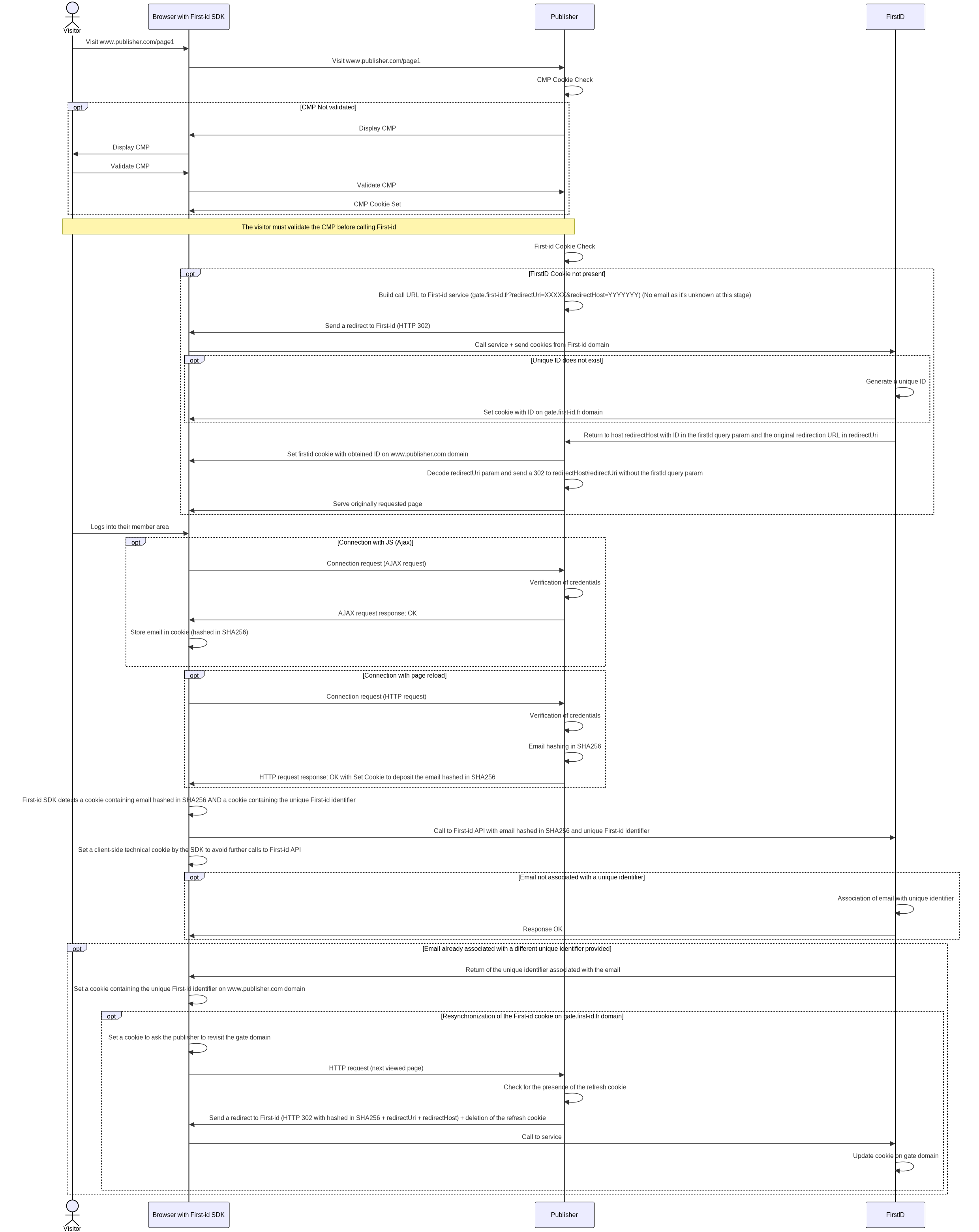
Here is a sequence diagram assuming the consent cookie is set on your domain:
# Prerequisites
- Nginx Proxy Manager installed from the official
jc21/nginx-proxy-managerimage (version 2.x). - A Proxy Host already configured for your website, with an SSL certificate: the
firstidcookie is aSecurecookie, so your website must be served over HTTPS. - An administrator account on the NPM interface.
You can check that the Lua module is present in your NPM container:
docker exec <NPM_CONTAINER_NAME> nginx -V 2>&1 | grep -o "ngx_lua[^ ]*"
# ngx_lua-0.10.31rc5
# Setup
# Open the Proxy Host advanced configuration
In the NPM administration interface:
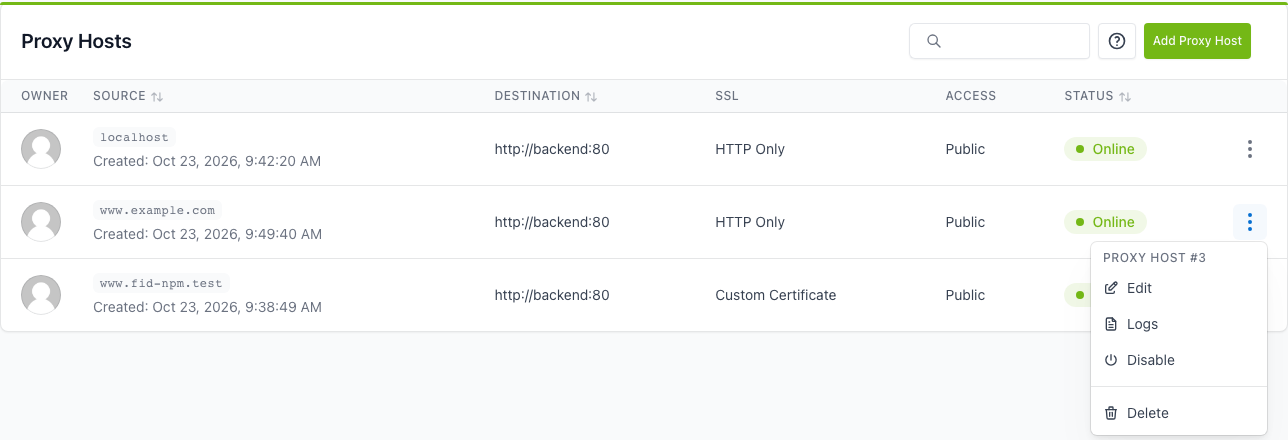
- Go to Hosts > Proxy Hosts.
- On your website's row, click the ⋮ menu, then Edit.
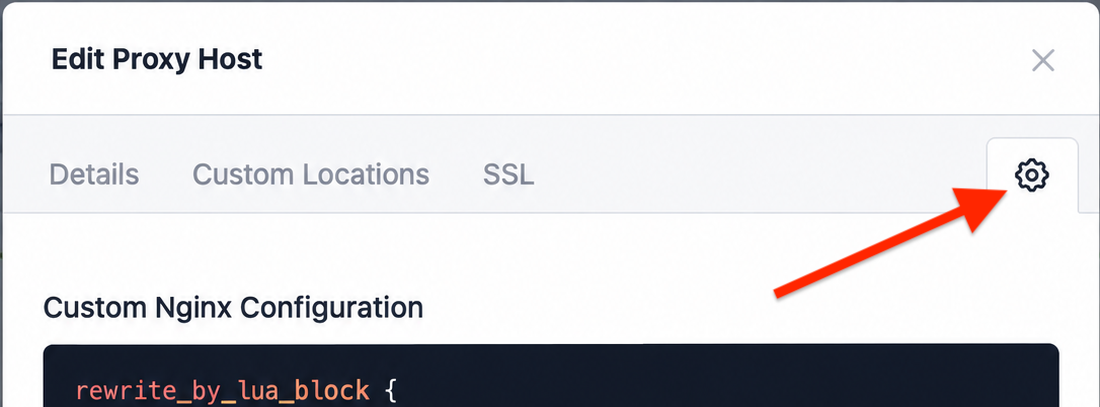
- Open the last tab, shown as a gear icon ⚙ (it is called Advanced in previous versions of the interface).
- Paste the configuration below into the Custom Nginx Configuration field.
# First-id configuration
rewrite_by_lua_block {
    -- First-id: Premium integration (redirection to the Gate)
    -- ---------- Configuration: adapt to your context ----------
    local GATE_URL       = "https://gate.first-id.fr" -- preproduction: https://gate.preprod.first-id.fr
    local CONSENT_COOKIE = "YOUR_CONSENT_COOKIE"  -- consent cookie set by your CMP
    local FIRSTID_COOKIE = "firstid"              -- cookie that will hold the First-id identifier
    local REFRESH_COOKIE = "firstid_refresh"      -- cookie set by the SDK to request a resynchronization
    local EMAIL_COOKIE   = "YOUR_EMAIL_COOKIE"    -- SHA256-hashed email (optional)
    local COOKIE_DOMAIN  = nil                    -- e.g. ".example.com"; nil = root domain of the host, like the SDK
    local COOKIE_MAX_AGE = 15552000               -- 180 days, align it with the consent duration
    -- -----------------------------------------------------------

    local var = ngx.var

    -- HTML pages only: no static files, no bots
    if ngx.req.get_method() ~= "GET" then return end
    if ngx.re.find(var.uri, [[\.(jpe?g|gif|png|json|js|woff2?|map|css|svg|ico|bmp|xml|ttf|txt)$]], "ijo") then return end
    local ua = var.http_user_agent
    if not ua or ngx.re.find(ua, [[bot|google|facebook|crawl|yahoo|bing|curl|parse\.ly|amp-validator|amphtml-validator|validator\.amp\.dev|seoPrisma|iframely|SpeedCurve|Convert NL Grabber|NL-Factory Grabber|outbrain|Slurp|ia_archiver|Screaming Frog SEO Spider|grapeshot|ias_crawler|proximic|Qwantify|Pinterest|360Spider|Flipboard|weborama-fetcher|upday|babbar\.tech|TTD-Content|Chrome-Lighthouse]], "ijo") then return end

    -- Nothing without consent
    if not var["cookie_" .. CONSENT_COOKIE] then return end

    local origin = var.scheme .. "://" .. (var.http_host or var.host)
    local domain = COOKIE_DOMAIN or (ngx.re.match(var.host, [[[^.]+\.[^.]+$]], "jo") or {})[0]
    local cookie_attrs = "; Path=/; Secure; SameSite=Lax" .. (domain and ("; Domain=" .. domain) or "")

    local function redirect(url, cookies)
        ngx.header["Set-Cookie"] = cookies
        ngx.header["Cache-Control"] = "no-store"
        ngx.header["Referrer-Policy"] = "no-referrer-when-downgrade" -- keeps the original referrer
        return ngx.redirect(url, 302)
    end

    -- Back from the Gate: ?firstId=XXX&redirectUri=/original-page
    local args = ngx.req.get_uri_args(20)
    if args.firstId ~= nil then
        local fid, redirect_uri = args.firstId, args.redirectUri
        if type(fid) == "string" and ngx.re.find(fid, [[^[A-Za-z0-9_]{1,64}$]], "jo")
            and type(redirect_uri) == "string" and ngx.re.find(redirect_uri, [[^/[^\x00-\x1f\x7f]*$]], "jo") then
            return redirect(origin .. redirect_uri, { FIRSTID_COOKIE .. "=" .. fid .. "; Max-Age=" .. COOKIE_MAX_AGE .. cookie_attrs })
        end
        return
    end

    -- Top-level navigations only (no fetch / XHR calls)
    local fetch_mode = var.http_sec_fetch_mode
    if fetch_mode and fetch_mode ~= "navigate" then return end

    -- Loop guard: at most one round trip to the Gate every 30 seconds
    if var.cookie_firstid_pending then return end

    -- Optional healthcheck: only active when the firstid_hc dictionary is declared
    local hc = ngx.shared.firstid_hc
    if hc and hc:get("status") ~= "ok" then return end

    local email = var["cookie_" .. EMAIL_COOKIE]
    if email and not ngx.re.find(email, [[^[a-f0-9]{64}$]], "ijo") then email = nil end
    local refresh = email and var["cookie_" .. REFRESH_COOKIE]

    -- Already a First-id and no resynchronization requested: serve the page
    if var["cookie_" .. FIRSTID_COOKIE] and not refresh then return end

    local gate = GATE_URL .. "?redirectHost=" .. ngx.escape_uri(origin)
        .. "&redirectUri=" .. ngx.escape_uri(var.request_uri)
    if email then gate = gate .. "&email=" .. email end

    local cookies = { "firstid_pending=1; Max-Age=30; Path=/; SameSite=Lax" }
    if refresh then
        -- delete the resynchronization request, whether it was set on the host or on the domain
        cookies[#cookies + 1] = REFRESH_COOKIE .. "=; Max-Age=0; Path=/"
        if domain then cookies[#cookies + 1] = REFRESH_COOKIE .. "=; Max-Age=0; Path=/; Domain=" .. domain end
    end
    return redirect(gate, cookies)
}
# Adapt the configuration
Only the constants at the top of the block need to be adapted:
| Constant | Default value | Purpose |
|---|---|---|
GATE_URL | https://gate.first-id.fr | Gate URL. Use https://gate.preprod.first-id.fr for your tests. |
CONSENT_COOKIE | YOUR_CONSENT_COOKIE | Name of the consent cookie set by your CMP. |
FIRSTID_COOKIE | firstid | Name of the cookie that will hold the First-id identifier. |
REFRESH_COOKIE | firstid_refresh | Name of the resynchronization cookie set by the SDK (customizable when initializing the SDK). |
EMAIL_COOKIE | YOUR_EMAIL_COOKIE | Name of the cookie holding the SHA256-hashed email. Keep the default value if you don't have one. |
COOKIE_DOMAIN | nil | Domain of the firstid cookie. By default, the root domain of the host (www.example.com → example.com), like the SDK. |
COOKIE_MAX_AGE | 15552000 | Lifetime of the firstid cookie in seconds (here 180 days). |
Then click Save. NPM checks the configuration (nginx -t) before reloading nginx.
Check your website right after saving
If the configuration contains a syntax error (incomplete copy-paste for instance), NPM does not apply it: it sets the file aside (data/nginx/proxy_host/<ID>.conf.err) and your website shows the NPM Default Site page until it is fixed. In NPM 2.16, the interface still displays the Online status.
After each save, reload a page of your website. If the Default Site page shows up, empty the Custom Nginx Configuration field and save to restore the website, then fix the configuration.
Cookie configuration
You have to create a Secure cookie on your main domain (see Cookie deposit).
The domain of the firstid cookie must be the same as the one used by the First-id SDK, otherwise the browser will keep two different firstid cookies. If you set the SDK cookieDomain option, use the same value for COOKIE_DOMAIN. Do the same if your domain has a two-part extension (.co.uk, .com.fr…): the default rule only keeps the last two levels of the host.
HTTPOnly
In order to be able to read the firstid cookie in client-side JavaScript, we do not recommend setting the httpOnly attribute.
GDPR
In this example, the cookie holding the First-id identifier has a lifetime of 180 days. This duration is completely arbitrary. Make sure the cookie lifetime matches the duration of the consent the user gave you.
Consent
You must only redirect the user once their consent has been obtained. If the mere presence of the consent cookie is not enough, replace the line if not var["cookie_" .. CONSENT_COOKIE] then return end with a test on its value, for example:
if var["cookie_" .. CONSENT_COOKIE] ~= "yes" then return end
# How it works
The configuration is declared at the server block level of the Proxy Host: it applies to every request of the website, including the Custom Locations you may have defined in NPM. It runs in the following order:
- Filters: only
GETrequests are processed. Static files and bots (list in the Points of attention) are never redirected. - Consent: without the
YOUR_CONSENT_COOKIEcookie, the request is passed to your website untouched. - Back from the gate: the gate sends the user back to
https://www.example.com/?firstId=XXX&redirectUri=%2Foriginal-page. The configuration sets thefirstidcookie, then returns a 302 to the page originally requested, without thefirstIdandredirectUriquery params. ThefirstIdvalue is checked before being written into the cookie, andredirectUrimust be a path of your website (no redirection to another domain). - Navigations only: the
fetch/ XHR calls of your pages (Sec-Fetch-Modeheader other thannavigate) are not redirected, the browser could not follow a redirection to the gate for an API call. - Loop guard: before leaving for the gate, a technical
firstid_pendingcookie is set for 30 seconds. While it is present, no new redirection is performed. If thefirstidcookie cannot be stored (website over HTTP, wrongCOOKIE_DOMAIN…), your visitors do not bounce endlessly between your website and the gate. - Healthcheck (optional): if you set it up (see below), no redirection is performed while the First-id service is unavailable.
- Redirection to the gate: if the user has no
firstidcookie, or if the SDK set thefirstid_refreshcookie and the hashed email is available, the user is redirected to the gate withredirectHost,redirectUriand, when available,email. On a resynchronization, thefirstid_refreshcookie is deleted in the same response.
URL encoding
The redirectHost and redirectUri parameters must be urlEncoded to be correctly interpreted. The configuration takes care of it with ngx.escape_uri, including the query params of the original page (/article?utm_source=news&page=2 becomes %2Farticle%3Futm_source%3Dnews%26page%3D2).
Users who opted out
For a user who objected to tracking, the gate returns the value NO_TRACKING instead of an identifier. It is stored as is in the firstid cookie: the user is no longer redirected and the SDK knows they must not be tracked.
Preserve my user's referrer
Redirections return the Referrer-Policy: no-referrer-when-downgrade header, as described here: the referrer of the original page is preserved.
Excluding redirections
The configuration already excludes the following file types:
jpe?g|gif|png|json|js|woff2?|map|css|svg|ico|bmp|xml|ttf|txt
The bot list is not exhaustive, we advise you to update it regularly.
NPM options
The configuration is compatible with the NPM Force SSL, HTTP/2 Support, Cache Assets and Block Common Exploits options. Force SSL runs first: a visitor arriving over HTTP is first sent to HTTPS, then to the gate.
If NPM receives traffic over HTTP behind another device terminating TLS (load balancer, CDN), replace var.scheme with "https" so the gate sends your users back over HTTPS.
If your advanced configuration already contains a rewrite_by_lua_block, merge both: nginx only accepts one per block.
# First-id healthcheck (optional)
To make sure the First-id service is online, we advise you to call our Healthcheck. This way, you will not redirect your users to an unavailable service.
This healthcheck has to be declared in the nginx http block, which the NPM interface does not allow. You therefore need access to the NPM data folder (the volume mounted on /data in the container). NPM automatically loads the data/nginx/custom/http_top.conf file if it exists.
Create the data/nginx/custom/http_top.conf file with the following content:
# First-id: Gate healthcheck (optional)
lua_shared_dict firstid_hc 64k;
lua_ssl_trusted_certificate /etc/ssl/certs/ca-certificates.crt;
lua_ssl_verify_depth 5;

init_worker_by_lua_block {
    local HOST     = "healthcheck.prod.first-id.fr" -- preproduction: healthcheck.preprod.first-id.fr
    local INTERVAL = 30                             -- seconds between two checks

    local function check(premature)
        if premature then return end
        local up = false
        local sock = ngx.socket.tcp()
        sock:settimeout(2000)
        if sock:connect(HOST, 443) and sock:sslhandshake(nil, HOST, true) then
            sock:send("GET /check-v2 HTTP/1.1\r\nHost: " .. HOST .. "\r\nConnection: close\r\n\r\n")
            local status_line = sock:receive("*l")
            local body = sock:receive("*a")
            up = status_line ~= nil and status_line:find(" 200 ", 1, true) ~= nil
                and body ~= nil and body:find('"status":"OK"', 1, true) ~= nil
        end
        sock:close()

        local hc = ngx.shared.firstid_hc
        if (hc:get("status") == "ok") ~= up then
            ngx.log(ngx.WARN, "First-id healthcheck: ", up and "OK" or "KO")
        end
        hc:set("status", up and "ok" or "ko", INTERVAL * 3)
    end

    -- a single worker polls the healthcheck, the status is shared by all workers
    if ngx.worker.id() == 0 then
        ngx.timer.at(0, check)
        ngx.timer.every(INTERVAL, check)
    end
}
Then reload nginx:
docker exec <NPM_CONTAINER_NAME> nginx -s reload
Here is what the configuration means:
- NPM calls
https://healthcheck.prod.first-id.fr/check-v2every 30 seconds =>INTERVAL = 30 - NPM gives the service 2 seconds to answer =>
sock:settimeout(2000) - The service is considered online if the response is an HTTP 200 containing
"status":"OK" - Without a recent result (3 intervals), the service is considered unavailable
Recommended endpoint: /check-v2 – reads a status precomputed every minute, more resilient to network slowness.
Nothing to change in the Proxy Host advanced configuration: it detects the healthcheck as soon as the firstid_hc dictionary exists, and stops redirecting to the gate while the status is not OK. Every status change is logged in data/logs/fallback_error.log:
[warn] [lua] http_top.conf:6):21: First-id healthcheck: OK, context: ngx.timer
# Testing the integration
Start by setting GATE_URL to the preproduction gate (https://gate.preprod.first-id.fr).
Test requests
curlis part of the excluded bot list: remember to send a browser User-Agent with the-Aoption.- Only
GETrequests are redirected: do not usecurl -I, which sends aHEADrequest.
Without consent, the page is served normally:
curl -s -o /dev/null -w '%{http_code}\n' -A "Mozilla/5.0 Chrome/141" https://www.example.com/my-article
# 200
With the consent cookie, the request is redirected to the gate:
curl -s -o /dev/null -D - -A "Mozilla/5.0 Chrome/141" -b "YOUR_CONSENT_COOKIE=1" https://www.example.com/my-article
# HTTP/2 302
# location: https://gate.preprod.first-id.fr?redirectHost=https%3A%2F%2Fwww.example.com&redirectUri=%2Fmy-article
# set-cookie: firstid_pending=1; Max-Age=30; Path=/; SameSite=Lax
# cache-control: no-store
# referrer-policy: no-referrer-when-downgrade
The full journey (round trip to the gate, cookie set, back to the requested page). The -c option makes curl store cookies, like a browser would:
curl -sL --max-redirs 5 -c /tmp/firstid-cookies.txt -b "YOUR_CONSENT_COOKIE=1" -o /dev/null -D - \
  -A "Mozilla/5.0 Chrome/141" https://www.example.com/my-article | grep -iE "^(HTTP|location|set-cookie: firstid=)"
# HTTP/2 302
# location: https://gate.preprod.first-id.fr?redirectHost=https%3A%2F%2Fwww.example.com&redirectUri=%2Fmy-article
# HTTP/2 302
# location: https://www.example.com/?firstId=2e3952281b71416693e5cfade8af64d1&redirectUri=%2Fmy-article
# set-cookie: firstid=2e3952281b71416693e5cfade8af64d1;expires=...;Path=/; Secure;Domain=.first-id.fr
# HTTP/2 302
# location: https://www.example.com/my-article
# set-cookie: firstid=2e3952281b71416693e5cfade8af64d1; Max-Age=15552000; Path=/; Secure; SameSite=Lax; Domain=example.com
# HTTP/2 200
Once your tests are validated, set GATE_URL back to https://gate.first-id.fr and save.
Troubleshooting
- Your website shows the NPM Default Site page: the configuration contains a syntax error. The
data/nginx/proxy_host/<ID>.conf.errfile confirms it, and the NPM API returns the exact nginx message (GET /api/nginx/proxy-hosts/<ID>,meta.nginx_errfield). - Lua error at runtime: check
data/logs/proxy-host-<ID>_error.log(the ID is shown at the top of the Proxy Host ⋮ menu, e.g.PROXY HOST #3). - No redirection: check the consent cookie name, the User-Agent used, and that no
firstid_pendingcookie remains from a previous test (it expires after 30 seconds).

Copyright © 2025 First-id