# Attention points
# Consent management
Consent Management
You should only redirect the user to our solution after obtaining their consent.
In the integration examples, we will assume that the name of your consent cookie is YOUR_CONSENT_COOKIE. We will not explicitly check its value, but only its presence, which equates to consent in our examples. You will need to adapt the examples with the name of the cookie you use for consent management, and optionally, its value.
# Avoiding unnecessary redirections
Excluding Redirections
You should not perform redirections for the following file types:
jpe?g|gif|png|json|js|woff2?|map|css|svg|ico|bmp|xml|ttf|txt
# Avoiding SEO issues
Bot Crawlers
We recommend applying the exclusions described in the implementations to avoid sending 302s to bots crawling your site. The list of bots provided is not exhaustive; we recommend keeping it updated regularly.
Here is a non-exhaustive list of crawlers. Each line corresponds to a filtering rule in the form of a Regex applied to the HTTP User-Agent header.
An example is provided in each backend implementation.
- "bot"
- "google"
- "facebook"
- "crawl"
- "yahoo"
- "bing"
- "curl"
- "parse.ly"
- "amp-validator"
- "amphtml-validator"
- "validator.amp.dev"
- "seoPrisma"
- "iframely"
- "SpeedCurve"
- "Convert NL Grabber"
- "NL-Factory Grabber"
- "outbrain"
- "Bot"
- "Google"
- "Slurp"
- "ia_archiver"
- "Screaming Frog SEO Spider"
- "grapeshot"
- "ias_crawler"
- "proximic"
- "Qwantify"
- "Pinterest"
- "360Spider"
- "Flipboard"
- "weborama-fetcher"
- "upday"
- "babbar.tech"
- "TTD-Content"
- "Chrome-Lighthouse"
# Retaining referrer
# Introduction
When we browse the internet, we often click on links that redirect us to other sites. When we click on a link, the browser sends an HTTP request to the server of the target site. This request contains information about the original page, known as the referrer.
This is manifested by an HTTP header Referer, which contains the URL of the original page.
To determine how to fill the Referer header, the browser adopts a referrer policy which can be of 8 types :
no-referrer: noRefererheader will be sentno-referrer-when-downgrade: theRefererheader will be sent if the request is secure (HTTPS) and the target domain is the same as the original domainorigin: theRefererheader will be sent if the request is secure (HTTPS) and the target domain is the same as the original domain, but only the domain will be sent and not the URL pathorigin-when-cross-origin: theRefererheader will be sent if the request is secure (HTTPS) and the target domain is the same as the original domain, but only the domain will be sent and not the URL path. If the request is not secure (HTTP), theRefererheader will be sent with the full pathsame-origin: theRefererheader will be sent if the request is secure (HTTPS) and the target domain is the same as the original domain, but only the domain will be sent and not the URL path. If the request is not secure (HTTP), theRefererheader will not be sentstrict-origin: theRefererheader will be sent if the request is secure (HTTPS) and the target domain is the same as the original domain, but only the domain and not the pathstrict-origin-when-cross-origin: theRefererheader will be sent if the request is secure (HTTPS) and the target domain is the same as the original domain, but only the domain and not the path. If the request is not secure (HTTP), theRefererheader will not be sentunsafe-url: theRefererheader will be sent with the full path
Referer and Referrer Policy
There is a missing 'R' in the Referer header due to an original spelling mistake in the specification. The Referrer-Policy header and referrer in JavaScript and the DOM are correctly spelled.
Default Referrer Policy of Browsers
Browsers have a default referrer policy which is strict-origin-when-cross-origin.
The Referrer policy is a header that your server can / should send with each HTTP request. This header allows you to modify the default referrer policy of the browser.
# Why retain the referrer?
The referrer is useful information because it allows you to know where the user is coming from. This helps to determine if the user is coming from a search engine, a social network, another site, etc... This information is often used by your analytics tools.
# Current behavior of first-id with the referrer strict-origin-when-cross-origin
The user arrives on the page /article1 of your site www.example.com via a search engine.
They have not yet accepted the CMP, and therefore do not yet have a unique First-id identifier.
They accept the CMP and continue browsing your site by clicking on the link /article2. The referrer of the HTTP request sent by the browser will therefore be https://www.example.com/article1, as we are navigating to the same domain (example.com). You retrieve the complete referrer (domain + URL path).
Your integration at the level of your CDN / backend server redirects the user to the First-id system to retrieve their unique identifier. The user is redirected to https://gate.first-id.fr?redirectHost=https%3A%2F%2Fwww.example.com&redirectUri=%2Farticle2
We redirect the user to https://www.example.com/?firstId=XXXX&redirectUri=%20article2 with the unique identifier in the query param firstId. The browser then sends an HTTP request to https://www.example.com/article2. As we have changed domains, the referrer sent by the browser will be https://www.example.com instead of https://www.example.com/article1.
Referrer and 302
As the First-id system performs a 302, the browser does not consider the intermediate domain that returned a 302. It will be able to recover the referrer (and the referrer policy) from the page before the redirection.
# How to retain the referrer?
All you need to do, when you send the visitor to the First-id system, is to change the referrer policy of the browser (strict-origin-when-cross-origin by default). To do this, modify the Referrer-Policy header of the HTTP response from your CDN / backend server to no-referrer-when-downgrade.
The value no-referrer-when-downgrade will allow the referrer from the original page to be "transferred" to the target page. This will retain the referrer from the original page when redirecting to the First-id system.
Thus, on the page /article2, you will have the referrer https://www.example.com/article1, instead of https://www.example.com.
Here is the sequence diagram of the user's navigation :
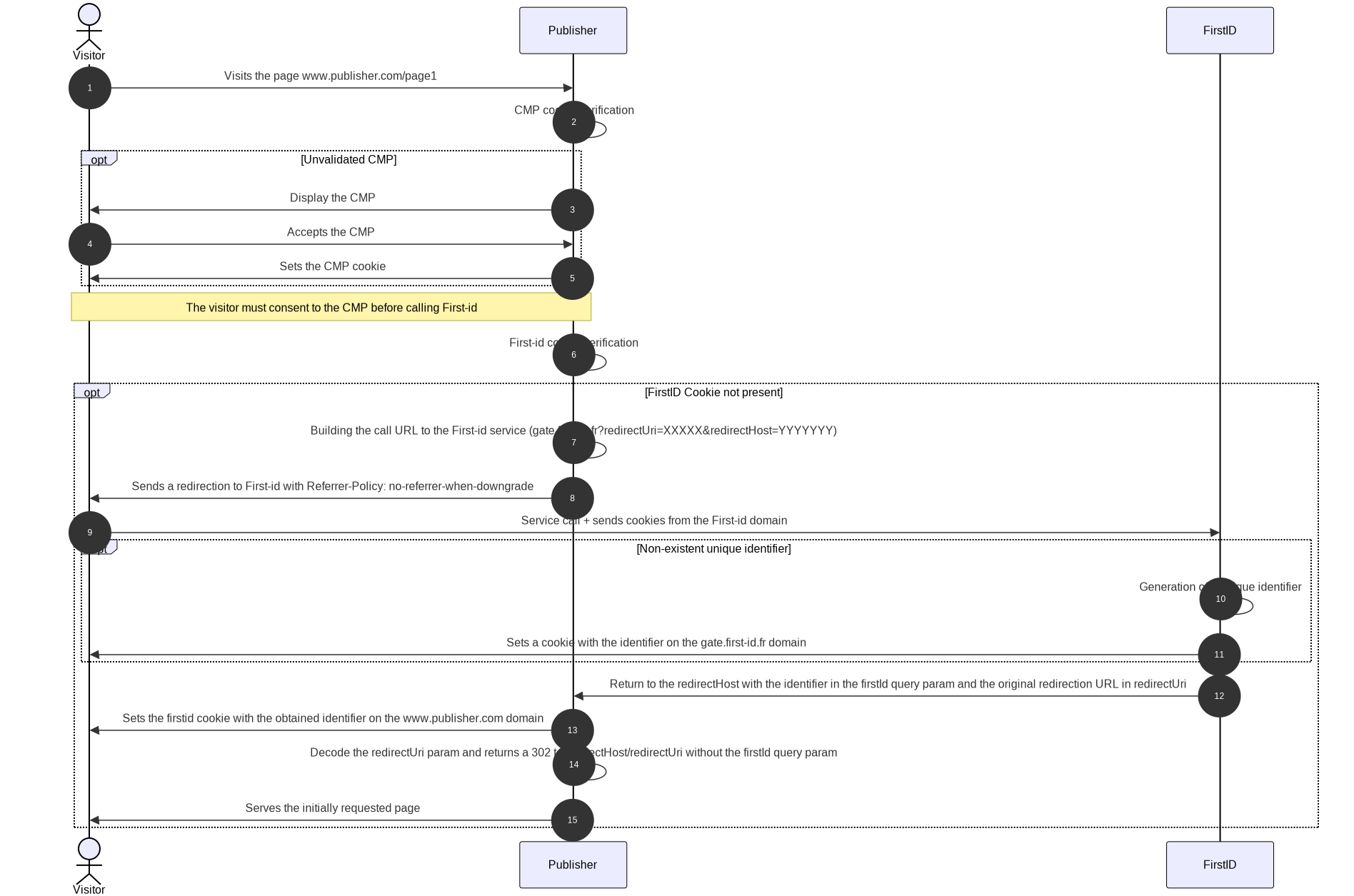
At step 8, your CDN / backend server redirects the user to the First-id system with the Referrer-Policy header set to no-referrer-when-downgrade.
# Technological stacks
You can integrate the First-id solution on the following technological stacks:
# On your CDN Recommended
Here we assume that your CDN is the first element in your infrastructure to handle requests from your users' browsers. It sits in front of your website.
Find our guides for the different CDNs on the market :
# On your HTTP cache server
# On your reverse proxy
# On your application backend
← Resilience Akamai →

Copyright © 2025 First-id