# Operation
First-id is a way to share an unique identifier among all partner sites using First-id technology.
To do this, we use a first-party cookie set on our domain. We call this domain the Gate :
- https://gate.first-id.fr : for the production environment.
- https://gate.preprod.first-id.fr : for the pre-production environment.
First, once a user has agreed to give their consent on the website's CMP (Consent Management Platform), you will redirect them to the Gate with the following parameters :
redirectHost: your website's host.redirectUri: the URI of the page on your website requested by the user.
If you have the user's email address at this point, you can send it to the portal with the following parameter :
email: the user's email address hashed with the SHA256 algorithm.
The Gate will then redirect the user to your homepage (provided in the redirectHost query parameter) with the following parameters :
firstId: the user's First-id token.redirectUri: the URI of the page on your website requested by the user (as you sent it to us before).
Now, you will need to:
- Set a cookie on your website's domain (a first-party cookie) with the name you want ("firstid", for example) and the value of the "firstId" parameter as the cookie's value.
- Redirect the user to the page specified in the "redirectUri" parameter.
Consent Management
You should only redirect the user to our solution after obtaining their consent.
To benefit from this feature, it is imperative to use the FirstID SDK.
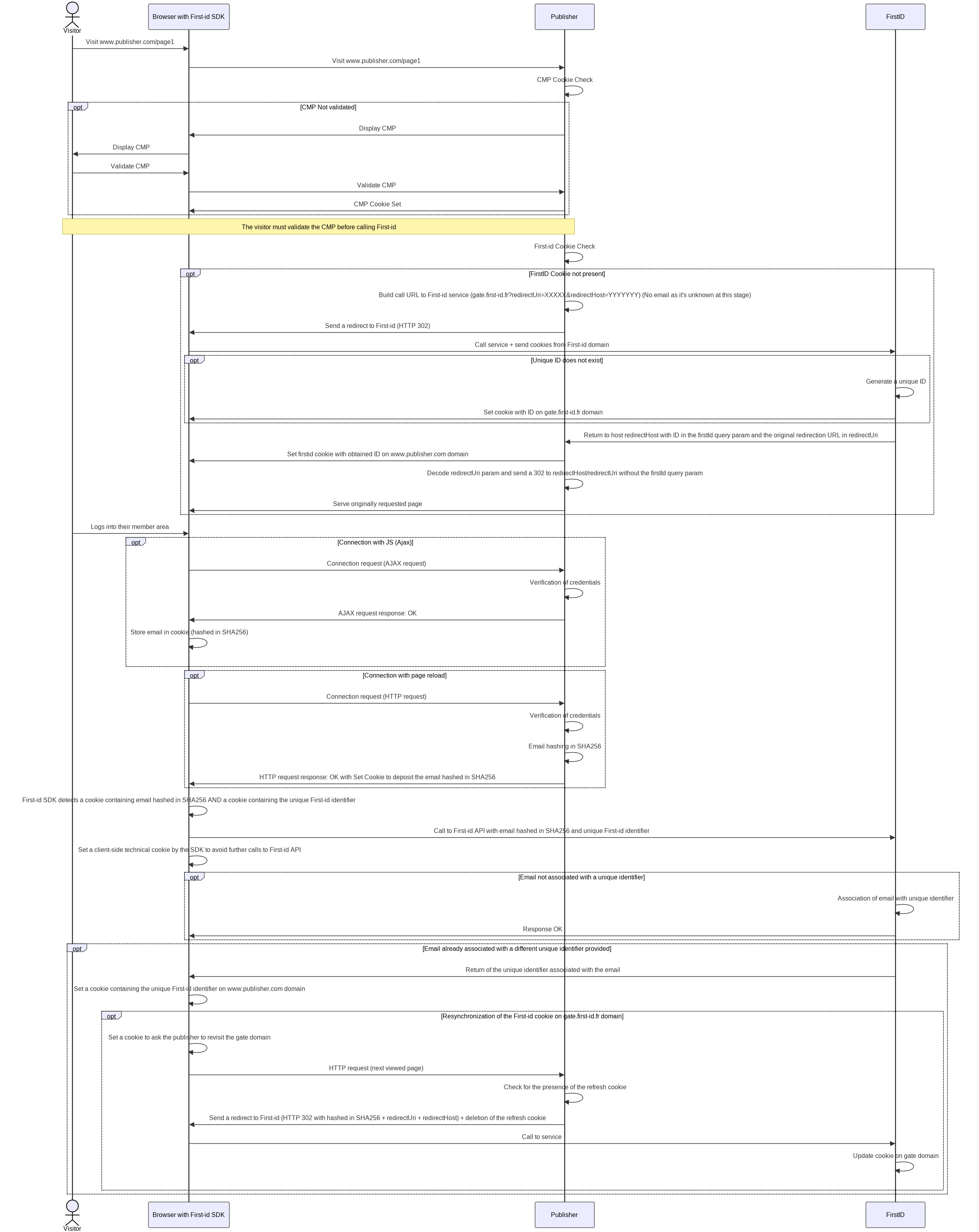
# Sequence Diagram
# Principle
As soon as a visitor arrives on your site, you must present them with a CMP to collect their consent for advertising tracking. Once this consent has been obtained, you can then start specific advertising targeting for this user. This is where the First-id system comes into play.
When accepting the CMP, we advise you to set a cookie. For the rest of the documentation, we will call it YOUR_CONSENT_COOKIE.
Now that you have collected your user's consent, you can call the First-id system to retrieve the unique tracking identifier for this user.
To do this, you must call the URL:
https://gate.first-id.fr?redirectHost=YYYYYYY&redirectUri=XXXXXfor theproductionenvironmenthttps://gate.preprod.first-id.fr?redirectHost=YYYYYYY&redirectUri=XXXXXfor thepreproductionenvironment
The redirectHost query param must contain a host (protocol + hostname, Example: https://wwww.publisher1-first-id.fr) encoded in urlEncode.
The redirectUri query param must contain a URI (we support query params and / or hash) encoded in urlEncode, URI to which we will redirect the user and to which we will add the tracking ID.
The user will be redirected to redirectHost/redirectUri.
# Handling Email via the First-id SDK
If you have the user's email, you can transmit it to First-id via its SDK in order to benefit from a cross-device ID.
To do this, we recommend hashing it in SHA256 and storing it in a cookie.
Once the email is hashed and stored in a cookie, you must transmit it to First-id via our SDK by indicating the cookie in which it is stored.
This will have the following effect :
- Associate the email with the unique First-id identifier
- Return the unique First-id identifier associated with the email if the First-id you have is different from the one associated with the email
So, the visitor may have the First-id value A, then when you retrieve their email and transmit it to First-id, we inform you that this email is actually associated with the First-id identifier value B.
In this case:
- The SDK will update the value of the cookie containing the First-id on your domain
- The SDK will deposit a
firstid_refreshcookie on your domain, which will need to be interpreted to update the cookie containing the First-id on the Gate domain by redirecting to the First-id Gate
To do this, you must redirect the user to the URL :
https://gate.first-id.fr?redirectHost=YYYYYYY&redirectUri=XXXXX&email=ZZZZZZZZZfor theproductionenvironmenthttps://gate.preprod.first-id.fr?redirectHost=YYYYYYY&redirectUri=XXXXX&email=ZZZZZZZZZfor thepreproductionenvironment
# Anatomy of the Unique Identifier
The unique First-id identifier is an alphanumeric string of 32 characters without any special characters.
Example of a First-id unique identifier : aevyknye48g9rx5328jr29839655w5pg.
Here is a regex to validate the format of the First-id identifie : [a-z0-9]{32}.
# Cookie deposit
Your cookie must be defined with the following attributes:
Secure: necessary so that the cookie can only be used if the page is accessed using HTTPS. Be careful when testing on development environments without HTTPS certificates.Domain=.mydomain.com: specifying the main domain allows the First-id cookie to be used on all sub-domains of your site.
# Integration Example
Your URL is: https://www.publisher.com/my-category/my-article-slug.
The host + scheme is https://www.publisher.com.
The URI is /my-article-slug.
The URI encoded in urlEncode is %2Fmy-article-slug.
The host encoded in urlEncode is https%3A%2F%2Fwww.publisher.com.
Cookie containing the email: YOUR_EMAIL_COOKIE.
Value of the YOUR_EMAIL_COOKIE cookie : 1f89176afafa8ab78d169346aa77d21a0e66b6a64df7d6a3ec84607f805f3a48.
The final call URL to First-id is therefore :
https://gate.first-id.fr?redirectHost=https%3A%2F%2Fwww.publisher.com&redirectUri=%2Fmy-article-slug&email=1f89176afafa8ab78d169346aa77d21a0e66b6a64df7d6a3ec84607f805f3a48for theproductionenvironmenthttps://gate.preprod.first-id.fr?redirectHost=https%3A%2F%2Fwww.publisher.com&redirectUri=%2Fmy-article-slug&email=1f89176afafa8ab78d169346aa77d21a0e66b6a64df7d6a3ec84607f805f3a48for thepreproductionenvironment
- NodeJS
- Browser JS
- PHP
'use strict';

const myRedirectHost = 'https://www.publisher.com';
const myRedirectUri = '/my-article-slug';

const myRedirectHostUrlEncodedata = encodeURIComponent(myRedirectHost);

const myRedirectUriUrlEncodedata = encodeURIComponent(myRedirectUri);

const firstIdRedirectUrl = `https://gate.first-id.fr?redirectHost=${myRedirectHostBase64data}&redirectUri=${myRedirectUriBase64data}`
# Retrieval of the Unique First-id Identifier
Once you have redirected your user to our platform, we will :
- Check if they have a unique identifier => if not, we will generate one for them,
- Redirect the user to the host provided in the
redirectHostquery parameter when calling our service, - Add the
firstIdquery params to the URL, which will contain the unique identifier for your user, and also theredirectUriquery param which contains the desired final redirection URL.
If they already have a unique identifier and an email is provided, we will look to see if the provided email is already associated with a unique identifier :
- If yes, we will return the unique identifier associated with the email and overwrite the identifier present in the cookie on the Gate domain with this one
- If not, we will associate the email with the unique identifier and return the unique identifier associated with the email
You must then :
- Extract and decode the
redirectUriandfirstIdquery params - Set a cookie containing the value of the
firstIdquery param - Return a 302 to the
redirectHost/redirectUriURI
Discover our integration solutions in the next chapter depending on your situation (CDN, HTTP cache server...).

Copyright © 2025 First-id