# AWS CloudFront
You can integrate First-id directly into your CloudFront distribution. To achieve this, you can use Lambda@Edge or a CloudFront function (opens new window).
These "@edge" functions will enable redirection to First-id and then deposit the First-id identifier into a cookie on your domain.
The difference between Lambda@Edge and a CloudFront function is as follows :
- Lambda@Edge is a Lambda function that runs on CloudFront's regional cache servers. When a request is made to a Point of Presence (POP), the Lambda@Edge function is executed on the nearest AWS regional cache server to the user. With Lambda@Edge, you can leverage the full potential of Lambda and make calls to other AWS services (Database, etc.). The latency for the end user will be higher than for a CloudFront function.
- CloudFront function is a "lambda" function that runs on CloudFront's cache servers (POP). When a request is made to a Point of Presence (POP). The POP does not need to call the AWS regional cache server, so the latency is very low. However, CloudFront functions have very strict execution time requirements and are limited in their use cases.
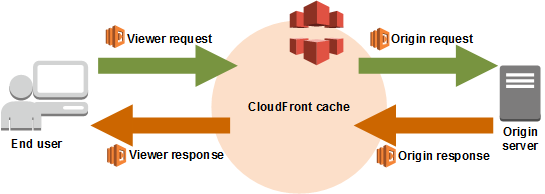
As a reminder, you can place a Lambda@Edge/CloudFront function on 4 events in the CloudFront lifecycle :
# Lambda
# 1. Create an IAM role
Go to the IAM service, and create a new role for the Lambda service.
Search for and add the AWSLambdaBasicExecutionRole policy. It will allow your Lambda to log to CloudWatch.
Name your role and create it.
Once the role is created, you will need to edit it to allow CloudFront to invoke your Lambda. To do this, search for your role using the name you previously assigned to it, then go to the Trust relationships tab. Click Edit trust relationship, and modify it as follows :
{
	"Version": "2012-10-17",
	"Statement": [
		{
			"Effect": "Allow",
			"Principal": {
				"Service": [
                  "lambda.amazonaws.com",
                  "edgelambda.amazonaws.com"
                ]
			},
			"Action": "sts:AssumeRole"
		}
	]
}
# 2. Create a Lambda function
Your function will be used @Edge. You must create it in the us-east-1 (Virginia) region.
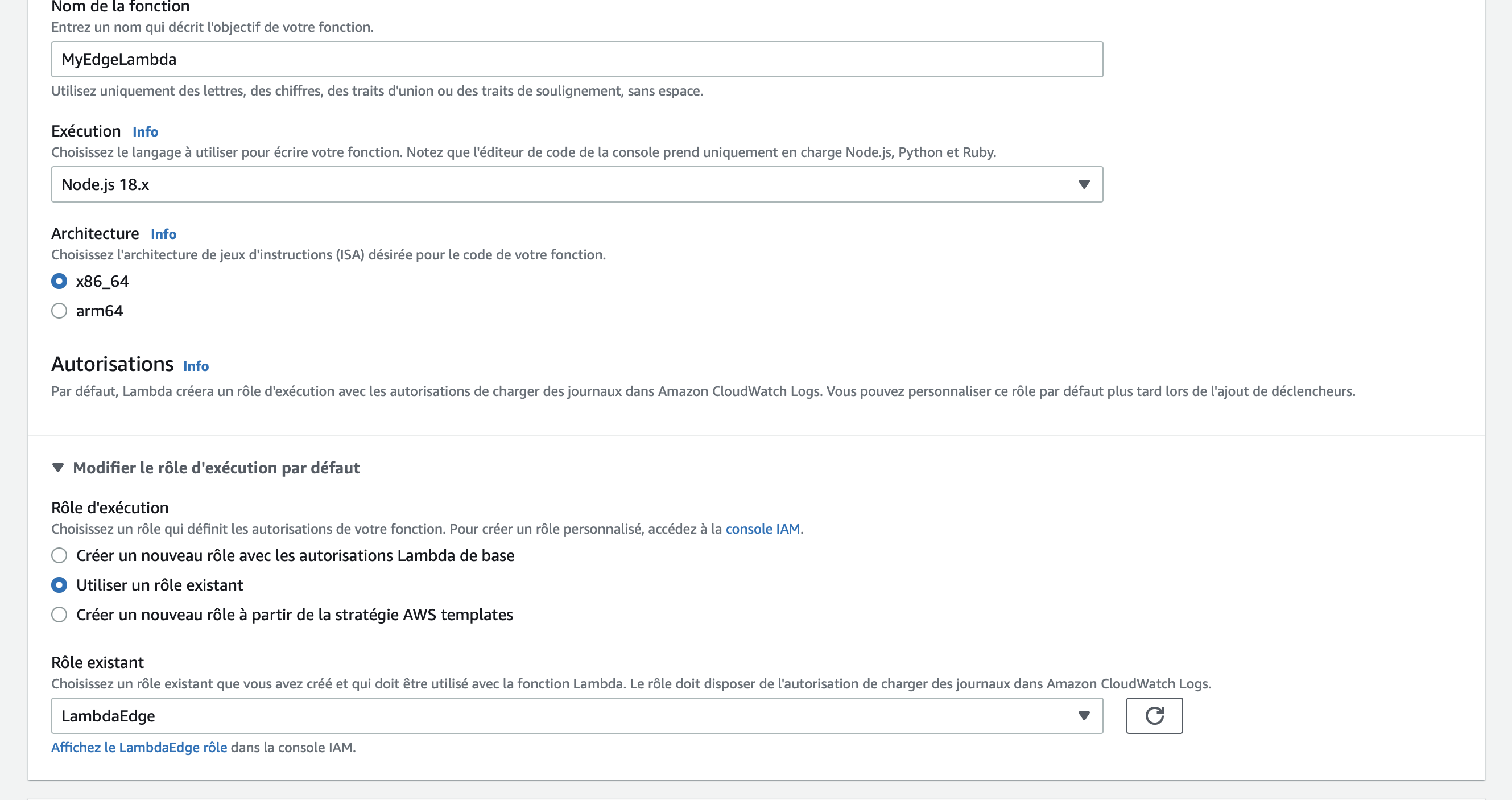
Create your Lambda function and attach the previously created IAM role to it.
Choose NodeJS 16.X as the runtime.
Use this code for your Lambda function :
Consent cookie
You should only redirect to First-id if your user has accepted consent via your CMP.
In the code below, a check is made to ensure that your consent cookie is available. Replace YOUR_CONSENT_COOKIE with the name of your cookie.
Cookie Configuration
Feel free to modify the cookie configuration (cookie expiration time, secure...).
You have to create a Secure cookie on your main domain (see Cookie deposit).
HTTPOnly
To retrieve the firstid cookie in client-side JavaScript, we do not recommend setting the httpOnly attribute.
export const handler = (event, context, callback) => {
  const request = event.Records[0].cf.request;
  const queryObject = {};

  if (request.querystring) {
    request.querystring.split("&").forEach(function(queryParam) {
      let [ name, ...rest] = queryParam.split(`=`);
      name = name?.trim();
      if (!name) return;
      const value = rest.join(`=`).trim();
      if (!value) return;
      queryObject[name] = decodeURIComponent(value);
    });
  }


  const headers = request.headers;

  const cookieList = {};

  if (headers.cookie) {
    for (let i = 0; i < headers.cookie.length; i++) {
      headers.cookie[i].value.split(`;`).forEach(function(cookie) {
        let [ name, ...rest] = cookie.split(`=`);
        name = name?.trim();
        if (!name) return;
        const value = rest.join(`=`).trim();
        if (!value) return;
        cookieList[name] = decodeURIComponent(value);
      });
    }
  }

  let cookieConsent = cookieList['YOUR_CONSENT_COOKIE'];

  let redirectUri = request.uri + (request.querystring ? `?${request.querystring}` : '')
  let redirectHost = `https://` + headers.host[0].value

  // First-id Cookie not exist and consent is given
  // You can add a check of the value of cookieConsent, but in this example, we consider if the cookie exists, the consent is given
  if (cookieConsent && !cookieList.firstid && !queryObject.firstId && !queryObject.redirectUri) {
    const response = {
      status: '302',
      statusDescription: 'Found',
      headers: {
        location: [
          {
            key: 'Location',
            value: `https://gate.first-id.fr?redirectHost=${encodeURIComponent(redirectHost)}&redirectUri=${encodeURIComponent(redirectUri)}`
          }
        ],
      }
    };
    callback(null, response);
  } else if (queryObject.firstId && queryObject.redirectUri) { // redirect from First-id, set firstid cookie, and make final redirection
    // configure cookie expiration time
    let maxAge = 86400 * 180 // 180 Days

    const response = {
      status: '302',
      statusDescription: 'Found',
      headers: {
        location: [
          {
            key: 'Location',
            value: `${redirectHost}${decodeURIComponent(queryObject.redirectUri)}`
          }
        ],
        'set-cookie': [
          {key: 'Set-Cookie', value:`firstid=${queryObject.firstId}; Path=/; Secure; Max-age=${maxAge}`},
        ]
      }
    };
    callback(null, response);
  }
  callback(null, request);
};
Click Deploy.

Go to the Versions tab and create a new version of your Lambda function.
Copy its ARN.
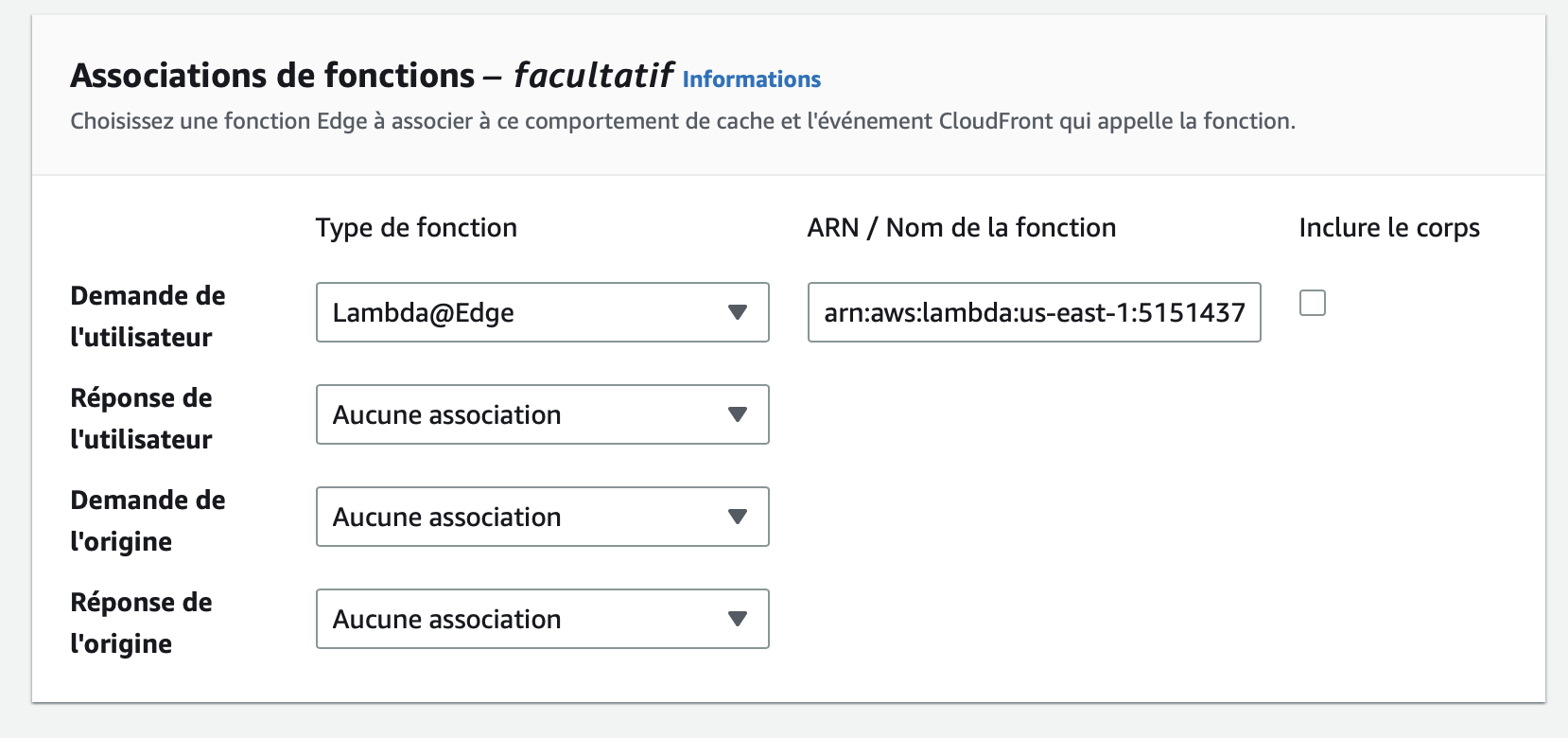
Then go to your CloudFront distribution. In the Behaviors tab, choose the one that serves your HTML pages. Edit it, and go to the Function associations section. Under Viewer Request, enter the ARN of your Lambda. Note: you must specify the ARN of the specific version of your Lambda function. Choose Lambda@Edge as the function type.
Save the changes, and wait for the distribution to be deployed for the changes to take effect.
# CloudFront function
To redirect to the First-id service, you can do it via a CloudFront function.
This alternative is cheaper and faster to execute. However, the version of NodeJS is more limited, associated resources (RAM, CPU) are also limited, and there are performance / response time constraints.
Go to the CloudFront service from the AWS console, then to the Functions section in the left menu.
Click on Create function, give it a name and description, then click on Create function.
In the Build tab, select the Development tab.
In the code editor, copy/paste the following code :
function handler(event) {
    var req = event.request;

    var str = '';
    if (req.querystring) {
        for (var key in req.querystring) {
            str=str.concat(`${key}=${req.querystring[key].value}&`)
        }
    }
    str = str.slice(0,-1)

    var redirectUri = req.uri + (str ? `?${str}` : '')
    var redirectHost = `https://` + req.headers.host.value
      // FirstID Cookie not exist and conset cookie exist
  // maybe you can add a check of the value of req.cookies['YOU_COOKIE_CONSENT_NAME'], in this exemple we consider that if the cookie exist, the consent is accept
  if (req.cookies['YOU_COOKIE_CONSENT_NAME'] && !req.cookies.firstid && !req.querystring.firstId && !req.querystring.redirectUri) {
    return {
      statusCode: 302,
      statusDescription: 'Found',
      headers: {
        location:
          {
            value: `https://gate.first-id.fr?redirectHost=${encodeURIComponent(redirectHost)}&redirectUri=${encodeURIComponent(redirectUri)}`
          }
      }
    };
  } else if (req.querystring.firstId && req.querystring.redirectUri) { // redirect from First-id, set firstid cookie and make final redirection
    // configure cookie expiration time
    let maxAge = 86400 * 180 // 180 Days

    return {
      statusCode: 302,
      statusDescription: 'Found',
      cookies: {
          firstid: {
              value: req.querystring.firstId.value,
              attributes: `Path=/; Secure; Max-age=${maxAge}`
          }
      },
      headers: {
        location:
          {
            value: `${redirectHost}${decodeURIComponent(req.querystring.redirectUri.value)}`
          }
      }
    };
  }

    return req
}
URL encoding
The redirectHost and redirectUri parameters must be encoded in urlEncode to be correctly interpreted.
Click the orange Save changes button at the top right of the editor.
Go to the Publish tab.
In the Publish section, click the orange Publish function button.
Your function is now deployed ! 🎉 Now all you need to do is associate it with your CloudFront distribution.
In the Associated distributions section, click on the Add association button. In the modal that opens :
Distribution: Select the ID of your distributionEvent type: Select Viewer RequestCache behavior: Select the cache(s) on which you want to deploy your CloudFront function
Click the Add association button to associate your function, and deploy the function to your distribution.
If you want to modify the code, refer to the limitations of CloudFront functions (opens new window) regarding the use of NodeJS.
Preserve User Referrer
To preserve the referrer of my user, I must take several actions described here.
Excluding Redirections
Warning, you should not perform redirections for the following file types:
jpe?g|gif|png|json|js|woff2?|map|css|svg|ico|bmp|xml|ttf|txt
Please add a filter on these file types in your configuration.
← Akamai Cloudflare →

Copyright © 2025 First-id